Note: The IDX Broker Support Team cannot assist with building, troubleshooting, or maintaining custom third-party applications or code that access the API. For assistance with custom integrations or development work, please contact your developer directly.
Additionally, this key does not provide unrestricted access to all MLS listing data. API access is limited to data and functionality associated with your IDX Broker account, such as:
- Leads and lead activity
- Saved Links
- Widget information and configurations
- Account search settings and fields
- Your office’s listing data (where applicable)
Access to MLS listing data itself remains subject to MLS permissions, account permissions, and IDX Broker platform limitations.
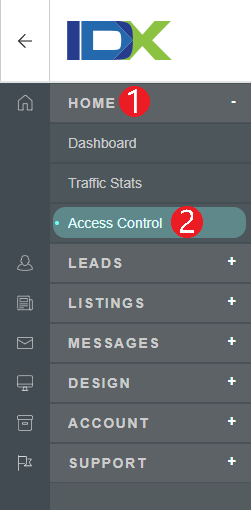
Every account includes the ability to generate one unique API key, which is required to access data from the API. You can manage your API key in your IDX control panel by clicking Home in the main menu, then Access Control in the submenu.
To generate a new API Key, click the blue New Key button. Your API Key will appear in green on the left side of the screen. You can also revoke your Key by clicking the red Revoke Key button. Revoking an API key will prevent any tools that use that key from accessing the API. If you are a developer partner, you will also have a key available within your partner login.
Note: Generating a new API key when you already have a key will replace your existing key.

API output can be formatted using either JSON encoded arrays and strings or XML encoded arrays and plain-text strings. Choose which format to use by clicking Set API Preferences.

Full end-user documentation for the IDX Broker API can be found by clicking here. The API allows you to use the Wordpress Plugin, or to access your leads, featured properties, and other information like your custom city lists. It does not allow you to access the entire MLS database via API. For additional support with your API, please email developers@idxbroker.com